
Merge PDF Files Online
Combine multiple PDF documents into one secure file.
or click to upload
Our Tools
Merge PDF Online – Free, Secure & Fast PDF Merger Tool | aitoolkitcenter
Merge PDF online easily without installing software or compromising your file privacy. aitoolkitcenter’s free PDF merge tool was created for individuals wishing to combine PDF documents easily, professionally and without the hassle of other tools.
Many users struggle when they need to merge PDF files online. Some tools force signups, some upload files to servers, and others feel unnecessarily complicated. This merge PDF online tool solves that exact problem. You upload your PDFs, arrange them in the right order, and download the merged file instantly — all inside your browser.
Merging PDF files shouldn’t be hard for anyone, whether they’re a student submitting an assignment, a professional making a report, or an office worker managing documents. That is exactly what this tool delivers.
Why Use This Merge PDF Online Tool
There are many tools that claim to merge PDF free, but most of them create unnecessary friction. Some upload documents to servers, some store files temporarily, and others require registration before you can even start.
This merge PDF online tool is designed with one clear principle:
solve the user’s problem without creating new ones.
What makes it different:
No file uploads to servers
No account creation
No hidden steps
No background processing
You open the tool, upload your files, and merge them. Nothing more.
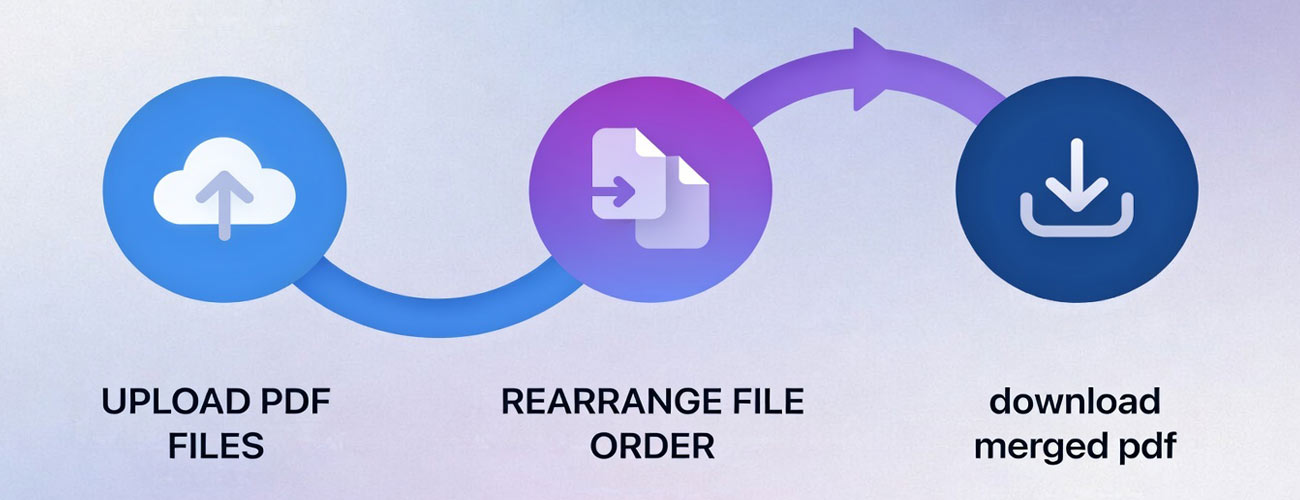
How to Merge PDF Online in Seconds
1️⃣ Upload Your PDF Files
2️⃣ Arrange Files in Order
3️⃣ Merge & Download
Features of Our Free PDF Merger Tool
This tool focuses on what users actually want, rather than bloated features.
- Merge PDF Free – No signup/no payment required to merge or combine PDF files. Free PDF Joiner –combines PDF files in seconds using this online tool. Responsive (easy to use) PDF merger interface.
- PDF Merger Tool: Lightweight and easy to use
- Drag & Drop Reordering: Drag-and-drop to re-order your files prior to merging.
- Works on All Devices: Compatible across all devices (mobile, tablet, desktop).
- Browser-Based Processing: Browser-based means files stay on your device and do not upload to another location.
- No File Storage: No uploaded or stored PDF files.
- Clean Interface: No clutter, no distractions
Who Should Use This PDF Merger Tool
This pdf merger online tool is of benefit to anyone who uses documents:
- Students are looking to combine their assignments or notes.
- Professionals looking to merge multiple reports or invoices.
- Teachers want to create a single study material for all their students from previously separate study materials.
- Business users looking for a quick way to combine documents for use in an office.
- If you’re looking for a way to combine pdf documents online without having to download and install software, this tool fits smoothly into your current workflow.
- Business users organizing documents quickly
If you need to combine PDF files online without installing software, this tool fits naturally into your workflow.
Privacy & Security You Can Trust
At aitoolkitcenter, privacy is not a claim — it is the foundation.
All processing happens inside your browser
No files are uploaded to any server
No storage, tracking, or logging
Your documents never leave your device
This client-side approach aligns with modern privacy expectations and builds real trust — for users and for AdSense approval.
Merge PDF Online – Frequently Asked QuestionsFrequently Asked Questions
Is this merge PDF online tool free to use?
Yes. This is a free PDF merger that does not require registration or sign-in.
Are my files uploaded to a server?
No. All processing happens directly in your browser. Files are not uploaded or stored.
Can I change the order of PDFs before merging?
Yes. You can drag and drop files to rearrange them before merging.
Is this tool usable on mobile devices?
Yes. The tool works smoothly on mobile phones and tablets.
What is the maximum file size allowed?
For optimal performance, you should only merge PDF files that are less than 25MB.
Why can’t password-protected PDFs be merged?
PDF files that are encrypted prevent you from accessing the pages in the file. If you are trying to upload an encrypted PDF, disable the encryption before trying to upload the file.
How can I analyze the merged PDF after I combine the files?
Once you have merged your PDF; you are able to use the Word Counter Tool for documents only. For PDF files, please use the PDF Word Counter online for precise statistics.
Can I merge PDFs without installing any software?
Yes. You can merge PDF online using our browser-based tool without installing any software or plugins.
The Merge PDF Online tool lets you combine multiple PDF files directly in your browser, keeping the process fast, simple, and secure.
This is ideal if you want to merge PDFs on different devices or systems without downloading applications.
Is there a way to extract text from a merged PDF file?
Yes, once you have merged and downloaded the resulting PDF document, it is possible to convert the file to an editable file if needed. If you would like to extract the text from a merged PDF file, use the Free PDF to Text Converter Tool to convert the file into a basic TXT (text) format. This tool allows you to quickly convert a PDF file into a format that is easier to copy, edit, and evaluate. This will be very useful if you have combined several different PDF files together and you need the text to add to documentation, to write a paper or to process further.
How do I check the word count after I merge multiple PDF documents together?
When you have completed merging and downloaded your PDF document, you may wish to know the length of your PDF document (how many words) and ultimately how long it is. For this purpose, you can check your word count using an online Free PDF Word Counter Tool. This tool allows you to count the number of words, characters, and pages directly from your PDF document without converting it. This will be very useful to students, writers, and other professionals who would like to know the exact document statistics after merging PDFs together.