Privacy & Security of Our Convert Image to PDF Online Tool
All images you use, will be processed in your browser. Uploading, storing, or tracking files is not done.
The above means that any file you convert will remain completely secure from being tracked and cannot be viewed or stored elsewhere on a different server.
- No Server Uploads
- No Data Retained
- No Tracking
- No third-party access
Your documents will remain entirely private.
Real Life Uses of Convert Image to PDF Online Tool
- Submitting office documents
- Government Forms
- College and School Assignment Submission
- Resume and Portfolio Preparation
- Managing Invoices and Bills
- Storage of Scanned Documents
- Sharing Legal Documents
Using our free Image to PDF Online Converter can make your daily digital tasks easier, whether you’re a student or a professional!
Why Convert Images to PDF Online Instead of Using Image Files?
- Formatting is Maintained
- Only One File Is Created For Multiple Images
- Should You Need To Print, PDF Documents Are More Easily Printed Than Multiple Image Files
- PDFs Provide A More Professional Appearance Than Images
- Multiple Images Can Be Converted to a Single PDF file with a smaller overall size
- PDFs can be read and used by any computer
This is why Your everyday digital life has become converting multiple images to PDF on a daily basis!
PDF is a globally accepted document standard maintained by Adobe and widely used across businesses, governments, and education platforms.PDF is a globally accepted document standard maintained by Adobe and widely used across businesses, governments, and education platforms.
What Makes Our Convert Image to PDF Online Work Better?
- Quick Content Creation
- Zero Watermarks
- Unlimited Use
- No Forced Sign Up
- Clean UI
- AdSense-safe design
- Mobile optimized
- Everything is designed for speed, simplicity, and trust.
This simple online image to PDF converter removes complexity and saves time, allowing anyone to create professional PDFs instantly without technical knowledge.
Common Questions (FAQ)
1) Is the convert image to PDF online tool completely free?
Yes! This converter is completely free to use; no hidden fees, no limits, or watermarks!
2) Will I be able to convert several images, for instance, into one single PDF file?
Yes! You can upload more than one image and combine them into one PDF in a few simple steps.
3) Can this converter convert HEIC images generated by an iPhone?
Yes! You can convert HEIC images into PDF files without installing any app.
4) Can I restructure my uploads before converting them?
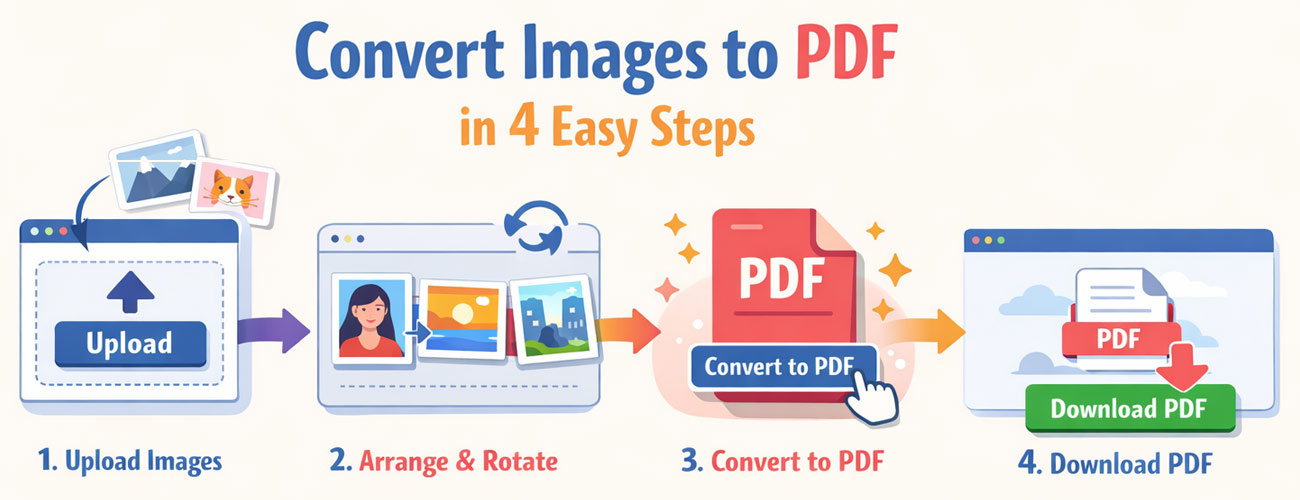
Yes! Restructuring is easy; all you need to do is drag and drop your files in your desired order.
5) If I upload an image that I need to rotate prior to converting it into a PDF, can I do this with this tool?
Yes! Rotating all of your uploaded images prior to converting them is easy.
6) Are all of my files secure while I am using this converter?
Absolutely! All files remain on your computer; this converter does not send any of your files to any other place.
7) Does this tool function on a mobile phone device?
Yes! The converter works flawlessly on all Android and iPhone devices, tablets, and desktop computers.
8) Which image formats can be converted to pdf?
JPG, PNG, HEIC, TIFF, BMP, & WEBP plus more.
Convert Image to PDF Online on Mobile, Desktop & Tablet
This free convert image to PDF online tool works perfectly across all devices including Android phones, iPhones, tablets, Windows PCs, and Mac computers. No downloads, no installation, and no technical knowledge required — simply upload your images, adjust them, and download your PDF instantly.